Findbest: compare AI answers and keep projects moving
A workspace for your AI accounts, recurring tasks and useful browser tools. Explore projects, answer transfers and prompts through practical examples and an honest look at Beta 0.30.3.
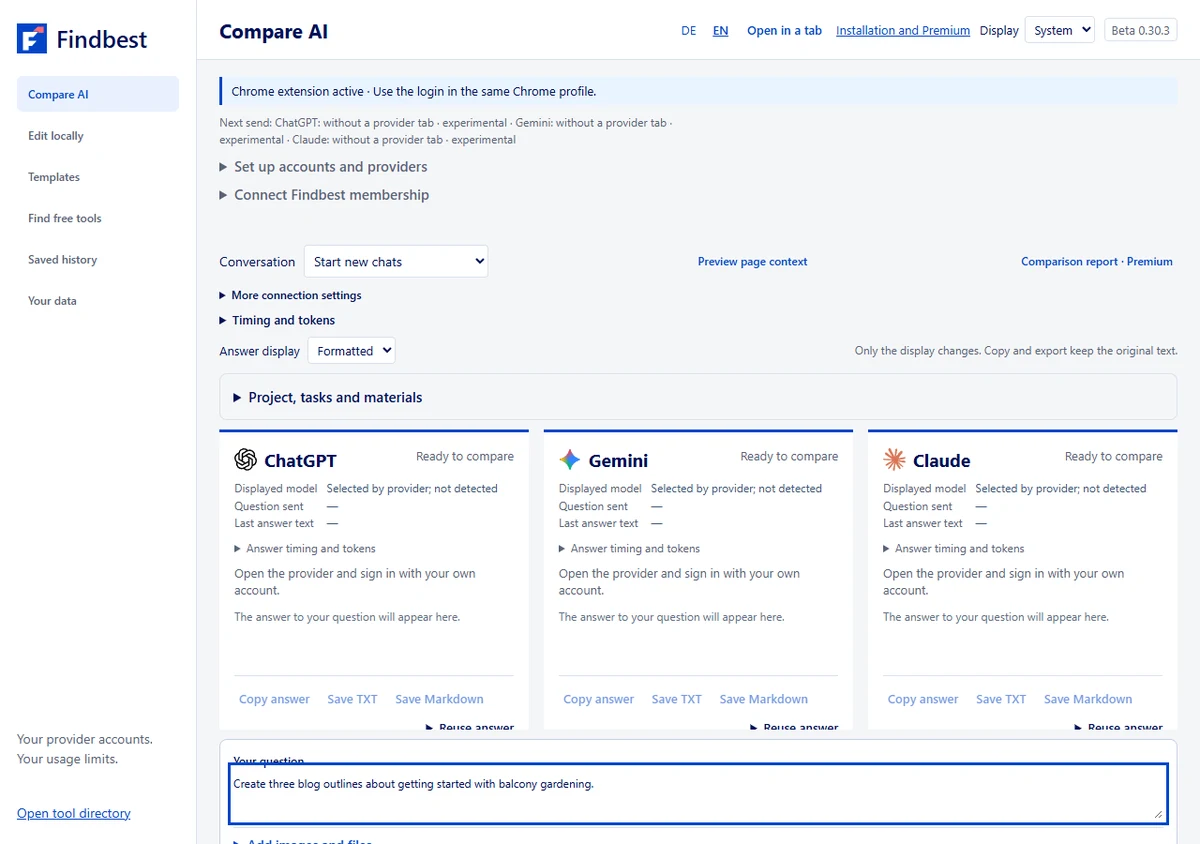
Keep recurring work together: instructions, references and saved answers in one project.
Transfers, shortening and blog steps first produce editable drafts that you choose to send.
An honest beta: provider connections remain experimental, and account limits and available models still apply.
Try the workflow with your own task
AI comparison runs in the Findbest extension for Chrome on your computer. First install the extension, open it in your browser and sign in to your AI providers. The website alone does not send questions to providers. Sending through web accounts remains experimental.
Install the extensionThe short answer
Working on a blog post, product description or job application and want more than one AI perspective? Findbest brings comparison and the next revision into one workspace. Choose providers, ask a question and review answers side by side or reuse one deliberately.
The aim is to use your existing ChatGPT, Claude and Gemini accounts while keeping recurring work in projects. Standing instructions capture audience, language and tone; follow-ups should stay in the assigned provider conversation.
Status: 7 October 2026, Beta 0.30.3. Project features, local tools and community management are published. Sending through provider web accounts remains experimental and real-account acceptance is incomplete. The previously reported ChatGPT sending issue is not confirmed fixed. Images show the real interface with example inputs, not measured AI responses.
The differences at a glance
| Area | In Beta 0.30.3 | Limit or requirement |
|---|---|---|
| Project instructions | Audience, language, tone, length, style | Included only when enabled |
| Tasks per AI | Different tasks per provider | Question with instructions: up to 12,000 characters per provider |
| Reuse answers | Transfer, shorten, explain, rewrite | Review draft and send yourself |
| Blog workflow | Ideas, outline, draft, critique, final article | Start each step deliberately |
| Saved projects | Encrypted instructions, references, favorites and chat mapping | Own passphrase; keep history open and unlocked to update |
| Images and documents | PNG, JPEG, WebP, PDF and TXT | Three files / 10 MiB; Gemini currently text only |
| Community prompts | Search, reuse, submit, edit, rate, report | Findbest account for contributions; approval before publication |
| Own prompt collections | Encrypted library with tags and favorites | Saving/editing Premium; public purchases disabled |
| Local tools | Resize images, edit PDFs, QR codes and text | No AI account; inputs stay in the browser |
| Provider web accounts | Experimental ChatGPT, Claude and Gemini adapters | Real-account acceptance incomplete; no unlimited free access |
Who Findbest is for
Findbest is intended for bloggers, freelancers, small marketing teams, students and people revising writing or code over several rounds. Its value comes after the first answer: keep instructions, ask follow-ups and request another perspective without rebuilding the brief each time.
Your AI provider accounts remain your own. A separate Findbest account is used for community contributions. Findbest does not unlock paid provider models or remove usage limits. The experimental connection uses sign-in managed by the browser; Findbest does not ask for AI account passwords.
Open practical example
Start with a weekly task: “Revise my newsletter opening. Preserve these three facts and use a friendly, factual tone.” Compare structure, adherence to instructions and the rework you need.
Example 1: develop a blog post as a project
Open “Project, tasks and materials” and apply the blog preset. Set audience, language, tone and length. Enable instructions for the next question. Provider-specific tasks can request a draft, a readability review or an alternative outline.
The blog workflow moves through ideas, outline, draft, critique and a final article. Choose the source answer. “Prepare step” produces an editable draft rather than automatically sending a sequence of requests.
Save a completed comparison in encrypted history. After restarting, unlock history and continue the assigned conversation. Successful follow-ups update the saved project while history remains open and unlocked in the extension. “New chat” explicitly clears the active chat mapping.
Open practical example
Project: balcony gardening for beginners. Audience: people with limited space and no gardening experience. Tone: clear and practical. Length: 800–1,200 words.
“Create three blog outlines about getting started with balcony gardening. Separate general tips from claims that need a source.”
Example roles: ChatGPT drafts; Claude reviews readability and unsupported claims; Gemini suggests another outline. These are sample assignments, not a measured ranking.
Example 2: revise product descriptions and emails
Apply the product-description preset and add confirmed details as reference text. Explicitly select which material accompanies the next question.
“Reuse answer” transfers an answer as an editable draft and selects the destination provider. Add your review instruction and send it yourself. Other providers retain their chat mapping. Shorten, explain and rewrite actions target the provider of that answer.
The same pattern suits emails: draft first, then adjust tone or length. Save a selected variant or entire answer with the project and reuse it later.
Open practical example
Confirmed details: drinking bottle, 700 ml, stainless steel, screw cap. “Write a product description of no more than 100 words. Use only these details. Do not invent certificates, sustainability claims or insulation times.”
Transfer: “Check that this description uses only confirmed product details. Flag unsupported claims and suggest a clearer opening.”
Email: “Shorten your previous answer to 80 words while preserving the date and three agreed tasks.”
Other scenarios: learning, applications and code
Presets also cover learning, job applications and programming. Ask for an explanation followed by examples or comprehension questions. Keep confirmed experience and tone together for an application. For code, collect requirements and ask another AI to identify edge cases.
Multiple perspectives help review, but three similar answers do not prove a claim correct. Check facts, requirements and actual results. The interface shows response timings and an optional rough text-token estimate. The estimate is not reported usage or billing.
Open practical example
Learning: “Explain compound interest using 100 francs. Ask three comprehension questions without giving the solutions immediately.”
Application: “Write an opening using my confirmed experience. Do not invent skills or employment dates.”
Code: “Review this function for empty inputs, decimals and unexpected data types. Provide test cases that can be checked.”
Images, PDFs, references and prompts
File transport supports PNG, JPEG, WebP, PDF and TXT, up to three files totaling 10 MiB. ChatGPT and Claude file paths are experimental; the current Gemini adapter supports text only. Provider limits still apply.
Reference text is encrypted with a saved project. Original files remain only in the open window and must be selected again after restarting. Your history passphrase is not stored and cannot be recovered if lost.
Community prompts are under “Templates”. Submit, edit, rate and report on the community page with your Findbest account. New and edited prompts require approval. The community starts without invented entries or ratings. Private AI chats are never published automatically. Own encrypted prompt collections retain their Premium restriction; public Premium purchases remain disabled.
Open practical example
Useful references include confirmed product details, approved statements and preferred terminology. Select only material the chosen providers should receive.
Simple file tasks may not need AI: local tools resize images, merge PDFs or select pages, create QR codes and clean text. Inputs for these tools remain in the browser.
How far along is the product?
Beta 0.30.3 is available on the website and as an extension download. Project instructions, provider tasks, transfers, blog steps, favorites, local tools and community management are implemented. Browser restart, encrypted restoration and targeted follow-ups have been tested in installed Chrome with controlled provider responses.
The central remaining work is reliable acceptance with real provider accounts. The reported ChatGPT sending issue is not confirmed fixed. Controlled responses cannot replace this acceptance. The extension has not been submitted to the Chrome Web Store; install the beta from the start page. Public Premium purchases are not enabled.
The next priority is connection stability, followed by improvements informed by real projects. No date for Store approval or additional providers is promised here.
Open practical example
Try a small project with one provider first. Ask a short question and a targeted follow-up, then verify both belong to the same provider conversation. Add providers or files afterwards. If sending fails, use “Copy error details”. Do not publish private questions, answers or credentials as community prompts.
Your practical comparison
What you need
Chrome, the current Findbest extension and your own accounts with chosen AI providers. Local tools need no provider sign-in. Community contributions require a Findbest account.
- Open the product start page and install Beta 0.30.3 if needed.
- Connect a provider and choose a model your account can access.
- Apply a project preset and add audience, tone and confirmed facts.
- Enable only instructions, references and files intended for this question.
- Review an answer and prepare a targeted follow-up or transfer.
- Save the completed comparison deliberately in encrypted history.
Example to get you started
“Create an outline for my blog post. Use the selected project instructions and flag claims that need evidence.”
Things to consider
Provider sending remains experimental. Your own accounts and provider limits apply. Original files are not saved permanently. A lost history passphrase cannot be recovered. Chrome Web Store distribution and public Premium purchases are not enabled.
More images
Select an image to view it in full at a larger size.
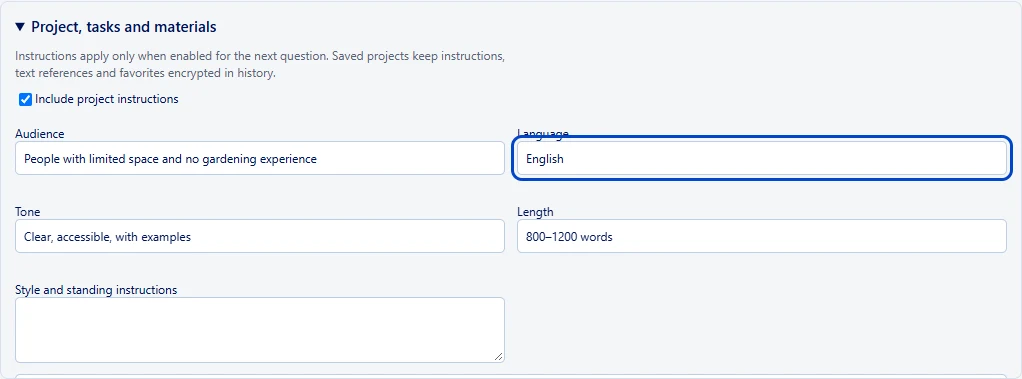
Real interface: example blog instructions. Applying a preset does not send a question.
Findbest · real screenshot, example input · Image source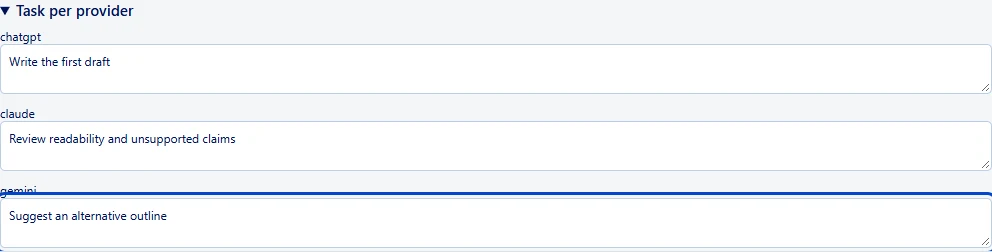
Example tasks per provider. Roles are chosen by the user, not a measured ranking.
Findbest · real screenshot, example input · Image sourceRead next


ChatGPT or Claude? The differences that matter at work
Create images, revise writing or build small tools: explore the practical differences, a clear decision guide and tasks you can try yourself.

Create an AI content brief: guide, example and checklist
Build a clear content brief for AI writing with a completed example, prompts for each stage and a checklist before approval.
 Notion · offizielles Presse-Logo
Turn meeting notes into clear tasks with AI
Separate decisions, open questions and actions without inventing owners or deadlines.
Was this article helpful?
Your feedback helps us improve our articles.
Votes are counted per language version. Repeat voting is limited; totals do not necessarily represent distinct people. Privacy